The whole account team, looking at the same picture of every stakeholder.
Why it matters
Relationships drive enterprise growth
"Enterprise accounts are won by teams, not individual sellers. Relationship Intelligence gives the whole account team the same picture of every stakeholder, and its AI Agents keep that picture current, so sellers spend their time on relationships instead of maintenance."
Ulrik Monberg, Founder and CEO, ARPEDIO
ARPEDIO Relationship Intelligence is the Salesforce-native product account teams use to map every stakeholder on an enterprise account: who decides, who influences whom, who supports you, and how strong each relationship is.
An enterprise account with 20 or more stakeholders is a team problem. At the center of it are the relationships your team has with each of those stakeholders, and winning the deal and growing the account depend on everyone seeing the same picture of them.
That picture is only as good as the tools that hold it. Until now, the org chart, the relationship assessments and the stakeholder details sat in separate components, and keeping them current fell to sellers, by hand.
Relationship Intelligence brings it together: tools designed to be simple to use, AI Agents that take on the manual upkeep of every org chart and relationship map, and the stakeholder data your team creates shown where the work happens.
What changed
Simple by design
Every Relationships tool now works the same way, in one workflow, so less time goes to searching and more to selling.
One component
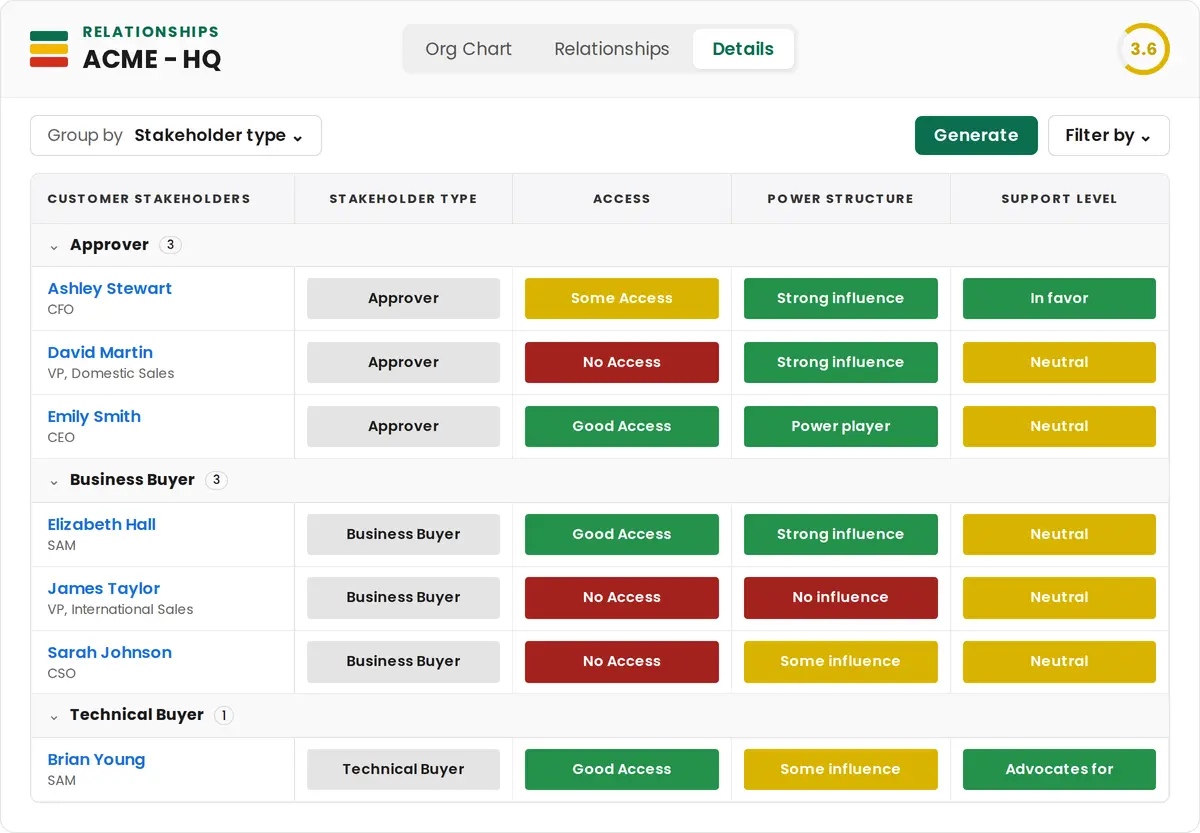
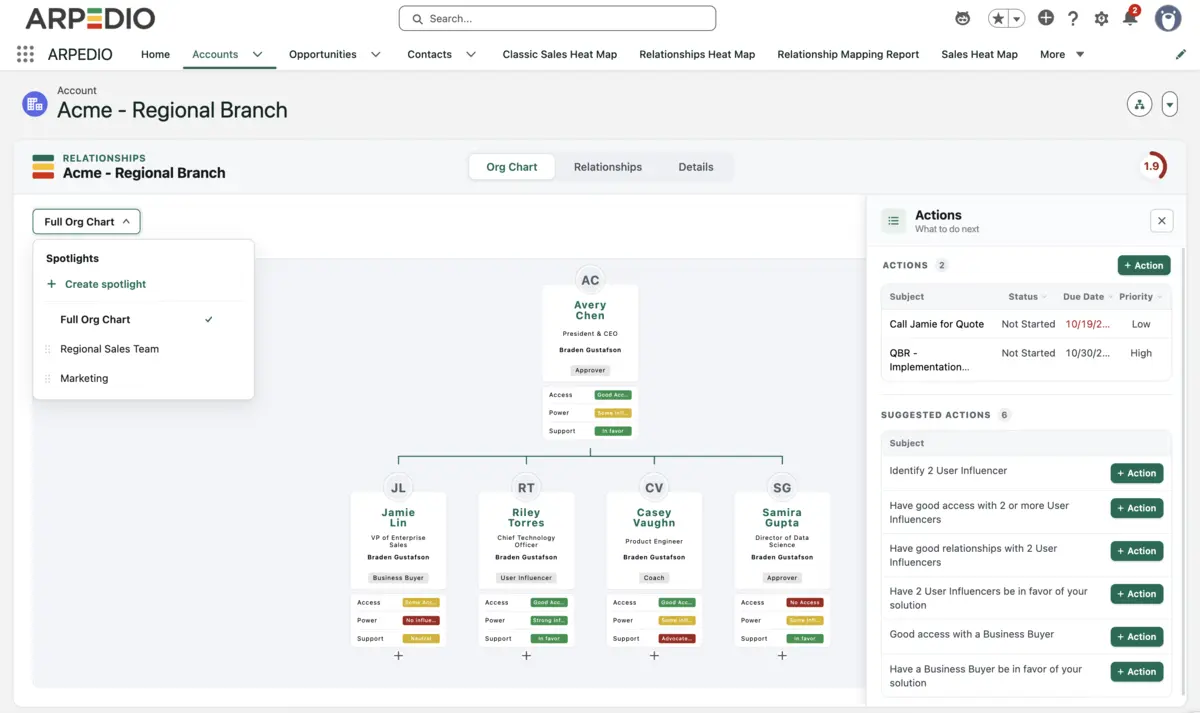
The org chart, the relationships grid and stakeholder details no longer sit in separate places. Every tool opens from the one Relationships component, and on new records a contact added in one tool appears in all of them.
Faster
Pages load faster, inputs save faster and every tool responds more quickly, so the system keeps up with the way your team works.
Easier to navigate
Zooming in on a card or a branch and moving a contact on the org chart take less effort, so the chart stays accurate as the account changes.
Influence lines and editing
Influence lines show who influences whom, filtered to one contact when you need it. Contacts and labels can be added directly under or between others, branches can be cut into their own tree, and exports are faster with new quality and background options.
AI Agents
Automated by intelligence
For years, CRMs worked as a system of record: they captured what had already happened, after the team spent hours logging it by hand. Simplifying the tools was half of this release. The other half is AI Agents, each built for a specific job that used to fall on sellers.
Eight AI Agents come with Relationship Intelligence, built on Agentforce and running inside your Salesforce instance.
Org Chart Generator and Optimizer
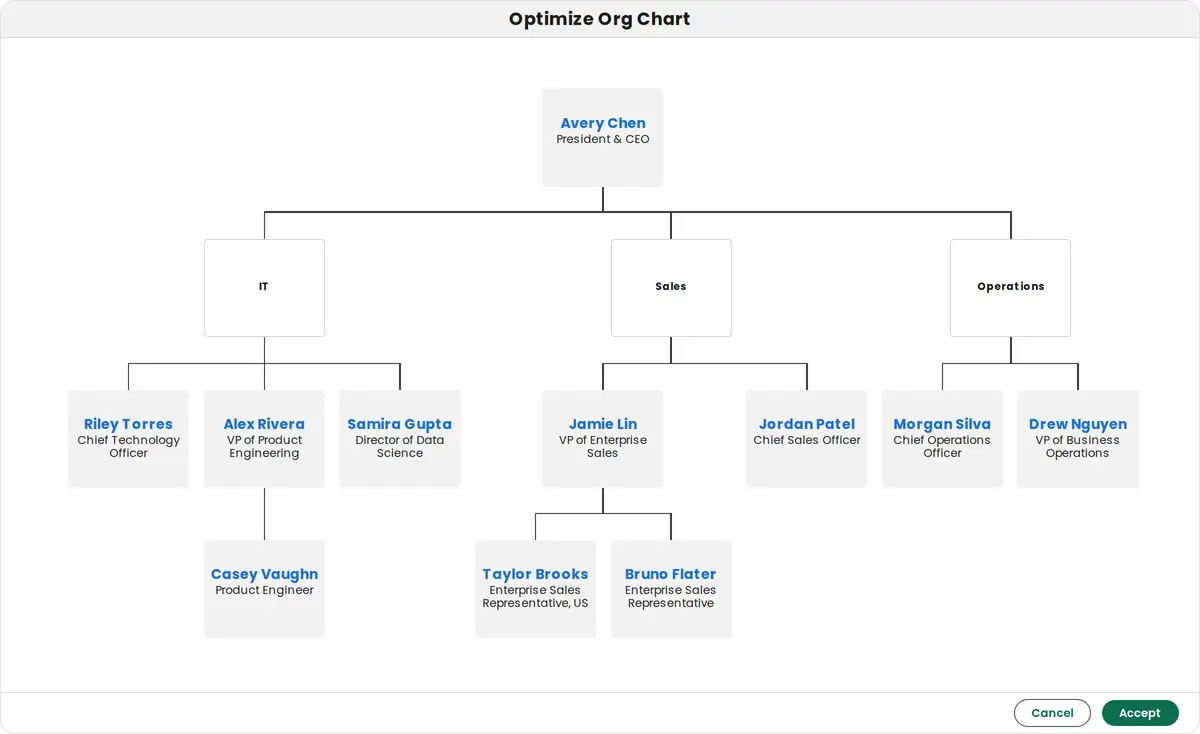
Org Chart Generator builds a complete org chart for an account from the contacts and activity already in Salesforce. Org Chart Optimizer improves the structure and contacts of an existing org chart, using the contact fields that matter in your organization.
Relationships Generator
Relationships Generator builds the relationships assessment from your interaction data: who on your team is talking to whom at your most important accounts.
Missing Contact Finder
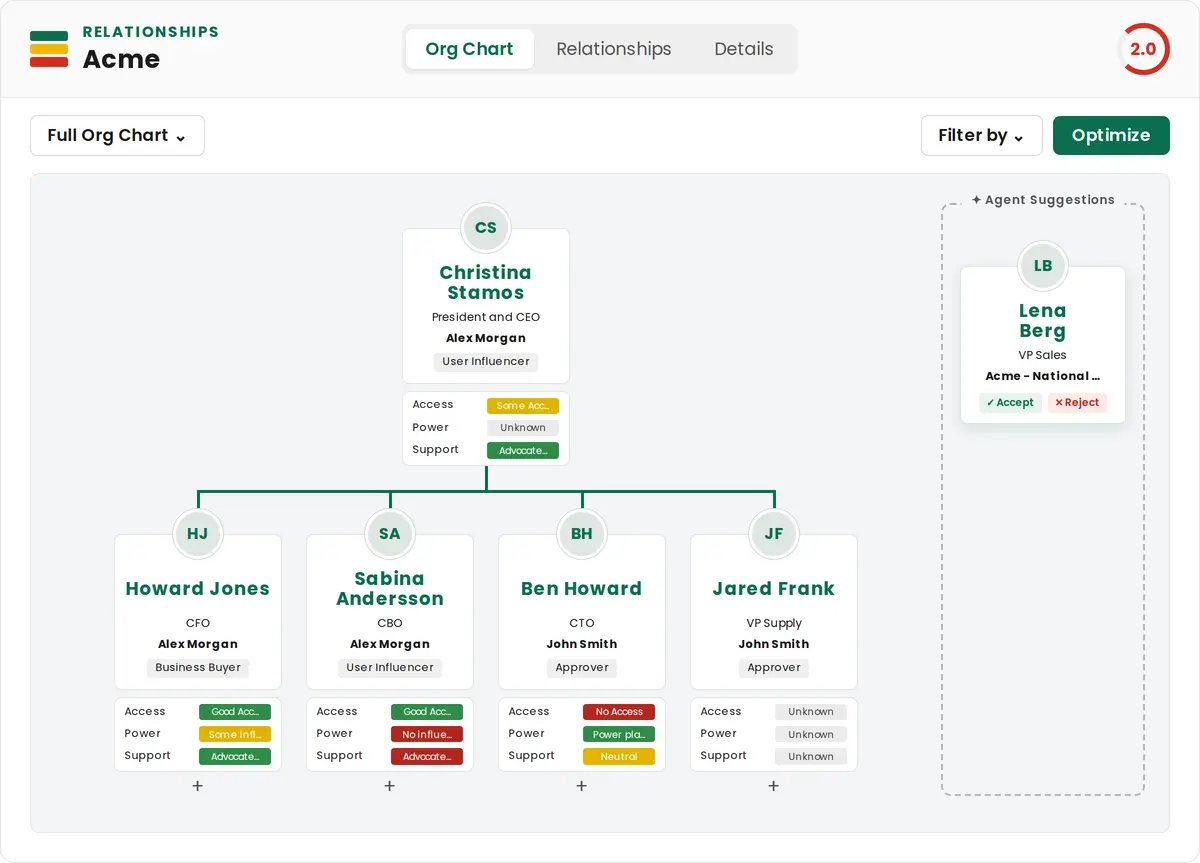
Missing Contact Finder finds people mentioned in emails and meetings who are missing from the org chart, and places them beside it as suggestions to drag in or reject.
Relationships Analyst
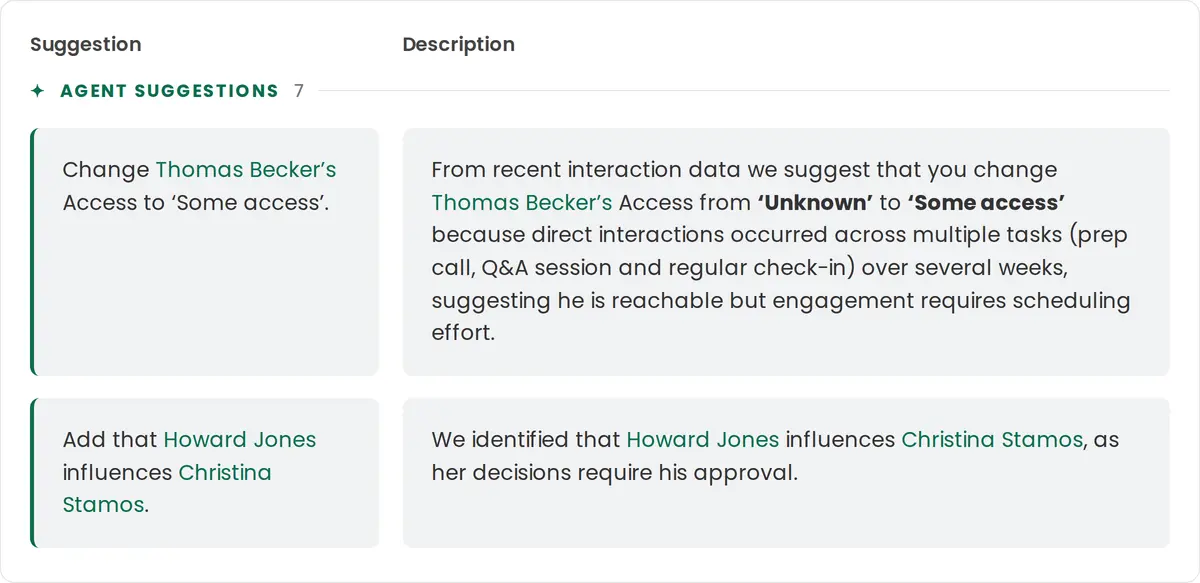
Relationships Analyst reviews recent interactions and suggests updates to how each relationship is assessed.
Influence Identifier
Influence Identifier uses the same interactions to find who influences whom.
Every suggestion arrives with its reasoning and the activity records it was based on, and waits for a person to accept or reject it. The agents depend on the data your team logs: richer activity in Salesforce produces better suggestions.
At Siemens Digital Industries Software, ARPEDIO agents automatically created more than 6,500 organization charts spanning more than 60,000 contacts during migration, work that previously took between 10 and 20 hours per chart.
Org Chart Image Uploader
Org Chart Image Uploader takes an image of any org chart and uses your Salesforce contacts to rebuild it as an editable ARPEDIO org chart.
Contact Researcher
Contact Researcher tracks job changes and departures among your most important stakeholders, alongside market news about their organizations, so Salesforce stays current and your team has a reason to call.
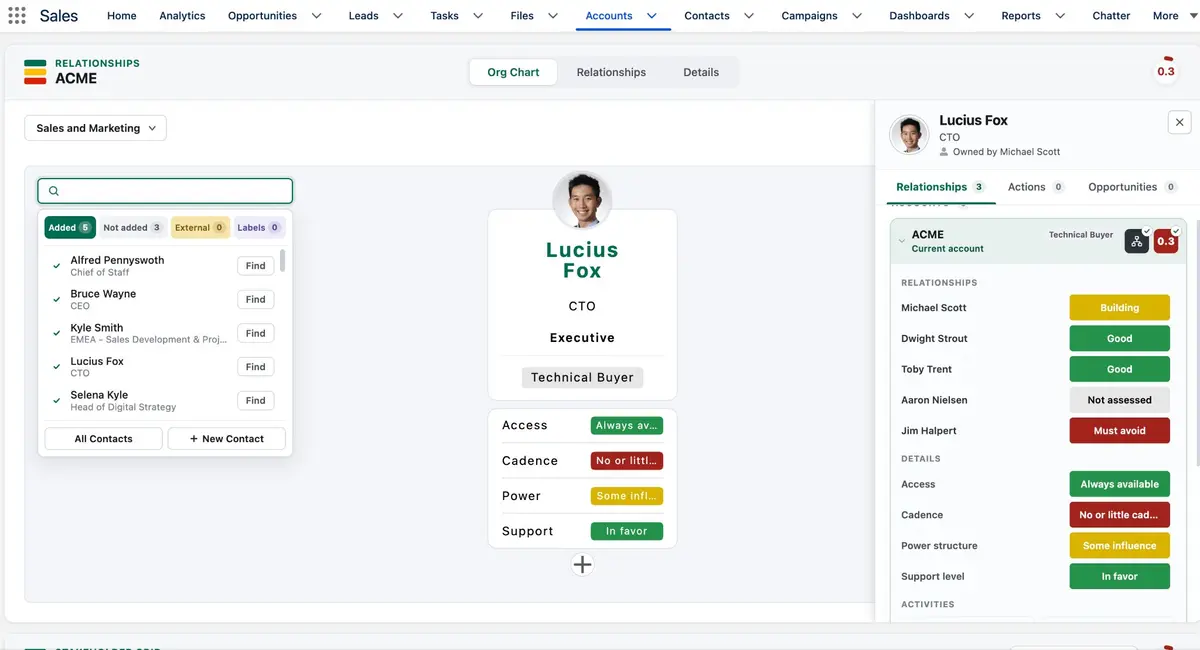
Every Relationships tool now shows the full picture of the account in the same layout, so the stakeholder data your team creates is in view where they act on it.
The contact dock
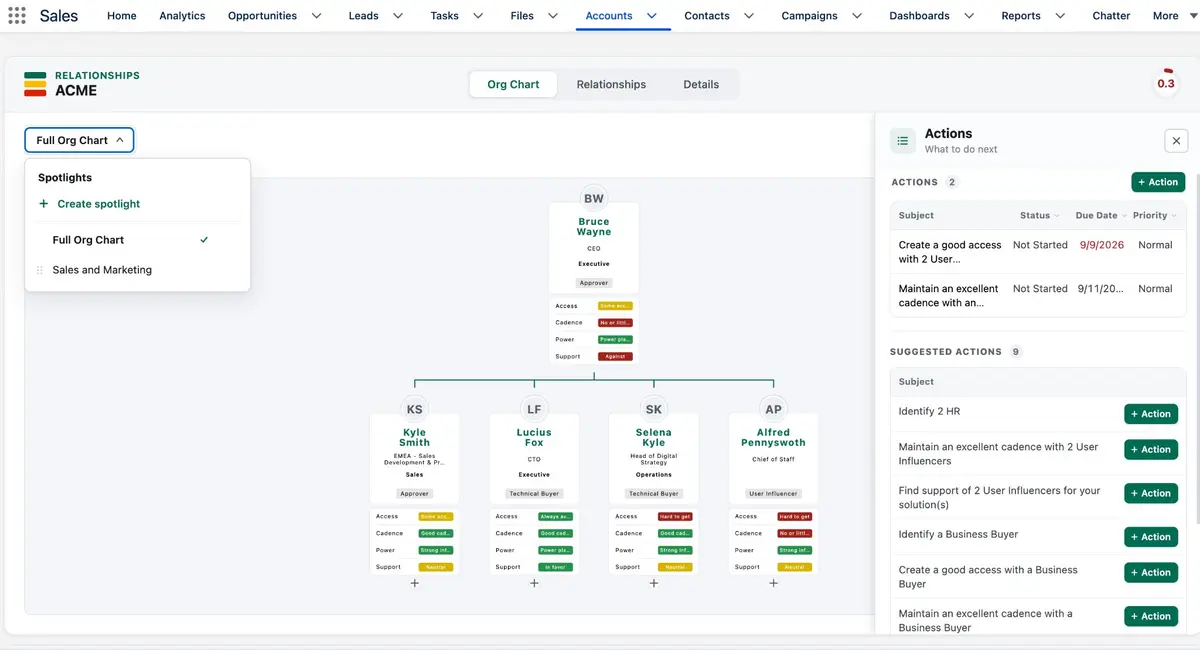
Click any stakeholder, in any Relationships tool, to open everything the team knows about them: relationship ratings by team member, access, cadence, power and support, actions, linked opportunities and notes. Ratings can be updated from the org chart directly.
The Actions dock
ARPEDIO Actions on the record you're viewing sit in one dock beside every tool: open and closed actions, and suggested actions such as identifying a business buyer, which become part of the plan in one click.
Spotlights
Spotlights replace tabs. Each one is a saved view of a group of contacts, such as a department or business unit, and it carries across every component.
The result is an account team that spends less time looking for answers and more time acting on them.
Getting started
Build your account's full picture
The new Relationships experience is available now on Salesforce AgentExchange.
ARPEDIO Relationship Intelligence is a Salesforce-native product for mapping every stakeholder on an enterprise account: the org chart, who influences whom, and how strong each relationship is with each member of your account team. It runs as a managed package inside your Salesforce instance.
What's new in this release?
The org chart, relationships grid and stakeholder details now sit in one Relationships component that loads and saves faster and is easier to navigate. The release adds Spotlights, an Actions dock beside every view, a contact dock, influence lines, faster exports, and AI Agents whose suggestions show their reasoning and source records.
Which AI Agents are live today?
Eight come with Relationship Intelligence: Org Chart Generator, Org Chart Optimizer, Relationships Generator, Org Chart Image Uploader, Influence Identifier, Missing Contact Finder, Relationships Analyst and Contact Researcher.
Do the agents change our data on their own?
Suggestions wait for a person. Each one shows what would change, why, and which activity records it came from, and a member of the account team accepts or rejects it in one click. The generators build a new org chart or relationships grid when someone asks them to.
Where does the data live?
Inside your Salesforce instance. Org charts, relationship assessments and notes are Salesforce records, governed by your security model and retention rules. Data never leaves Salesforce.
What happens to the Matrix after the upgrade?
The Matrix is now Relationships & Details and keeps your existing assessments. Matrix Preview is now the Stakeholder Map, Matrix Summary is the Relationships Overview, and Activities are now Interactions. Your Customer Success contact can walk your admin through the upgrade.